FAQ
You get the code directly from our youtube channel
YouTube
you can find the code in the descriptions of the unlcok code video in the playlist. Just play the video to see the descriptions. Maybe you still need to unfold the descriptions (click "show more")
I still can't find the code...
You can find the code without even having an account there but you can also contact us and we will send you the code by mail. However, this may take a few days. We'd be happy if you still share our page with your friends.
No, you can also check out as guest. However you only receive download links via email that expire after 12 hours. You also won't be able to get any product updates or new versions. Therefore we strongly recommend you to create an account with us.
If you already have an account with us the new purchased products will automatically be added.
- click on the "add to cart" button.
- the product(s) will be shown in the shopping cart on the top right
- accept our terms below and check out
- login to your yummybeats account, create an account or continue as guest
- you will then automatically be directed to PayPal.
- login to your PayPal account (or continue by entering your payment data) and confirm the order. In some countries you don't necessarily need to sign up for a PayPal account although we would recommend that
- after successful payment you will automatically be directed back to our web site (this can takes up to 10 seconds)
- back on our site you will get your personal download links. Additionally an e-mail with your download links will be sent to your PayPal registered e-Mail address. If you have not purchased as a guest, you can furthermore download your products in your account
First have a look into your account if the purchased products are listed there. If they aren't or if you don't have any access please use our contact form and send us the following information:
- Your PayPal e-Mail address (you did the purchase with)
- Your first and your last name
We will send you the missing product(s) manually via e-Mail as soon as possible (usually within 1-3 working days)
IMPORTANT: we only send you the missing products to your (PayPal) email you did the purchase with. So please make sure that this email works
- create a top folder and name it eg. YummyBeats
- put all downloaded installation files into this folder
- click on the installation file and install the content
Note: with updates you may get asked to overwrite old files click "yes" or "yes to all" no files will be erased.
SOUND PACK INSTALLATION
Always install the Sound Pack after you have installed the Basic Product.
- copy or move the sound pack file into the related instruemnts folder
like the "AmberWood Drums" folder or the Massive Evolutions 2 folder- extract the content and overwrite all files with the new ones
All files are rar archives, so don't mind the exe ending in this case.
- rename the file ending from exe to rar or right click on the exe
- extract the content with your favorite rar archiver tool like UnrarX or B1 Free Archiver,...
a topfolder with the name of the rar file will be created - create a folder and name it eg. YummyBeats (if you haven't done yet)
- put all files from the created topfolder into the YummyBeats folder
Note: with updates some old files will probably be overwritten
SOUND PACK INSTALLATION
Always install the Sound Pack after you have installed the Basic Product.
- extract the content of the sound pack rar
- copy the "sounds" and the "Data" folder into the related instrument folder* (also the "Snapshots" and the "docs" folder if available)
*) like the "AmberWood Drums" folder or the Massive Evolutions 2 folder- overwrite all files with the new ones
We recommend using the Quick-Load Catalog to enhance your work flow. This Catalog let's you organize and categorize all your Kontakt libraries thus gives you a much better access, than the beloved libraries tab itself. So your "Kontkat-Libraries" are always accessible quick and easy. Of course the Quick-Load Catalog can be used for any library (nki) from any vendor.
- in Kontakt hit CTRL + F or right click (into free space) to open the Quick-Load Catalog
- open your Windows Explorer or Finder and navigate to the relevant folder of your instrument.
- drag the relevant nki in the Quick-Load Browser to favor the Instrument permanently
- via right mouse click you can even create folders for making own categories and sub-categories
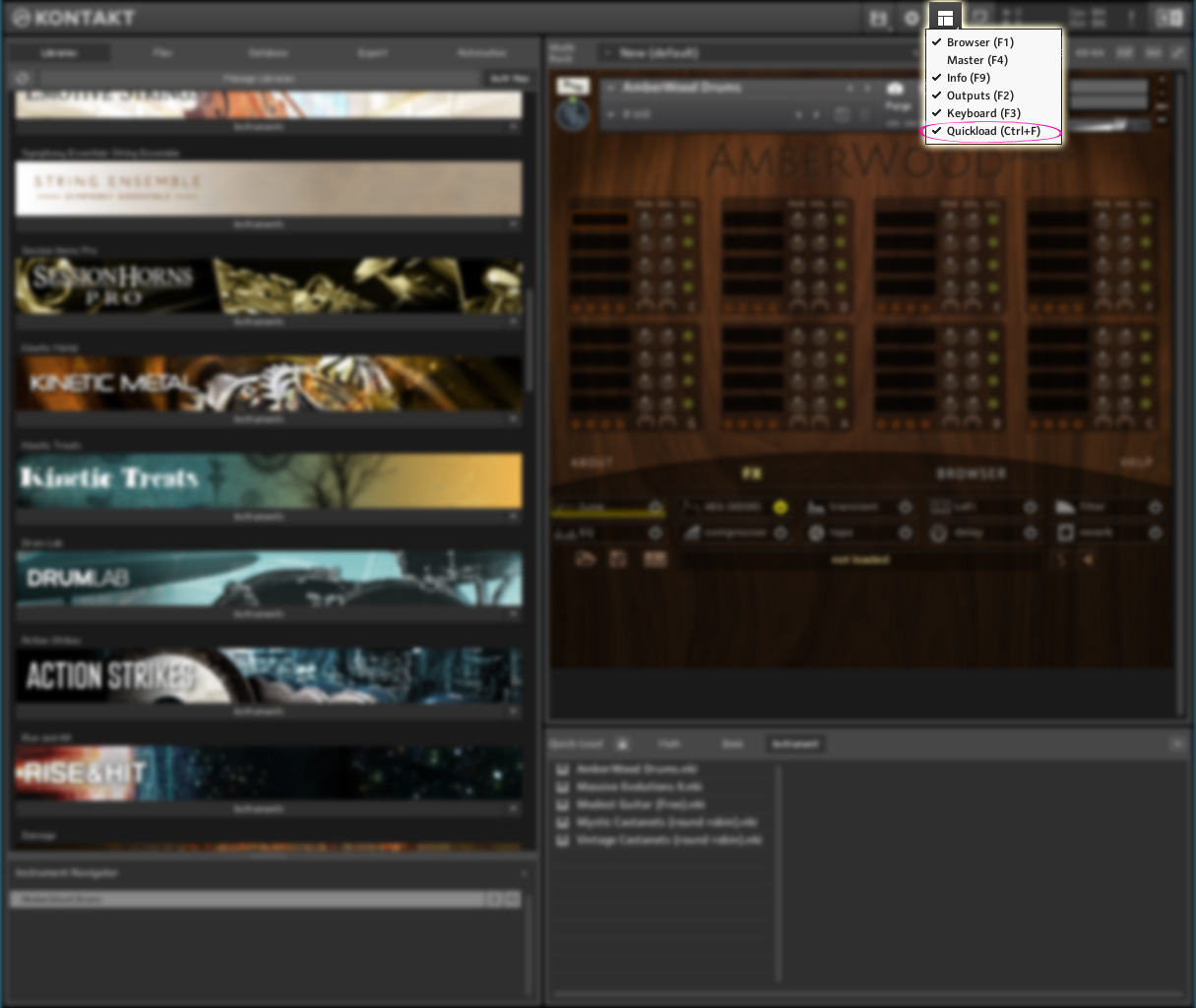
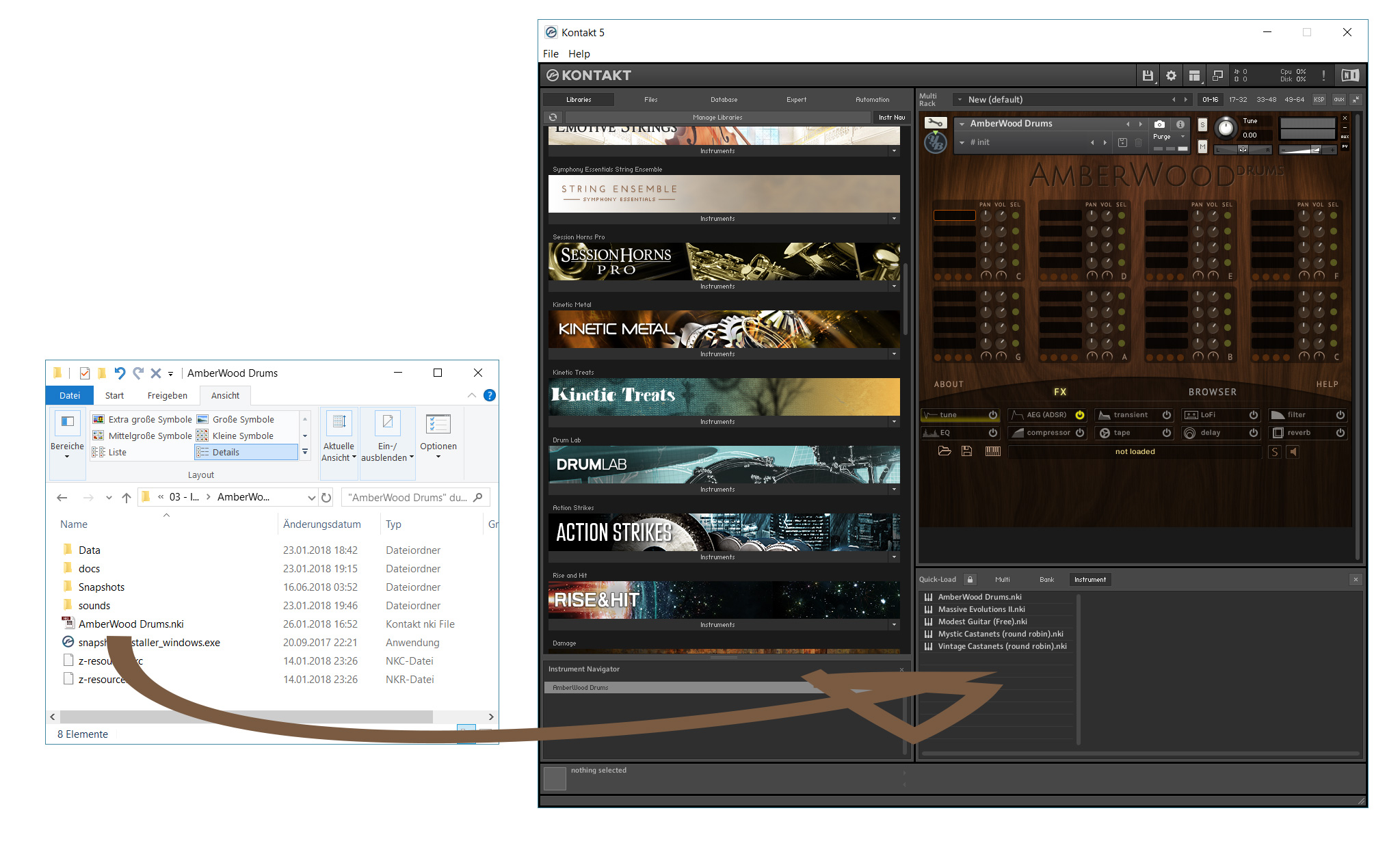
This official video from Native Instruments also shows how it works:
Please make sure that you've entered a valid e-mail address. Also check your Spam filter settings and look into your Spam folder. If you still didn't receive any confirmation mail, please contact us
This could be caused by incorrectly set cookies. Simply delete the (session) cookies from www.yummybeats.com in your browser.
If you still can't log in please contact us
 : The sounds are (also) available as wav and for use with any wav compatible DAWs (like Cubase, Logic, Ableton, FL Studio, ProTools,...) as well as hardware and software sampler like Battery, Kontakt, Groove Agent, Machine, MPC,....
 : Sample based instruments for Kontakt 5+. The full version of Kontakt is required. With the free Kontakt Player our instruments only work in a demo mode (15 minutes each session).
 : Presets for NI - Massive. Sometimes they are only additionally included. Massive from Native Instruments is required to be able to use the presets.
Sometimes our Libraries contain a combination of different file formats. However not more than ONE third party software is required to use a library without restrictions.
Since we offer extensions for some of the products, these hastags help you to find all related products quick and easy. Simply type a hastag in the search field above.
No, the Demo Beats only show a small excerpt of a library.